


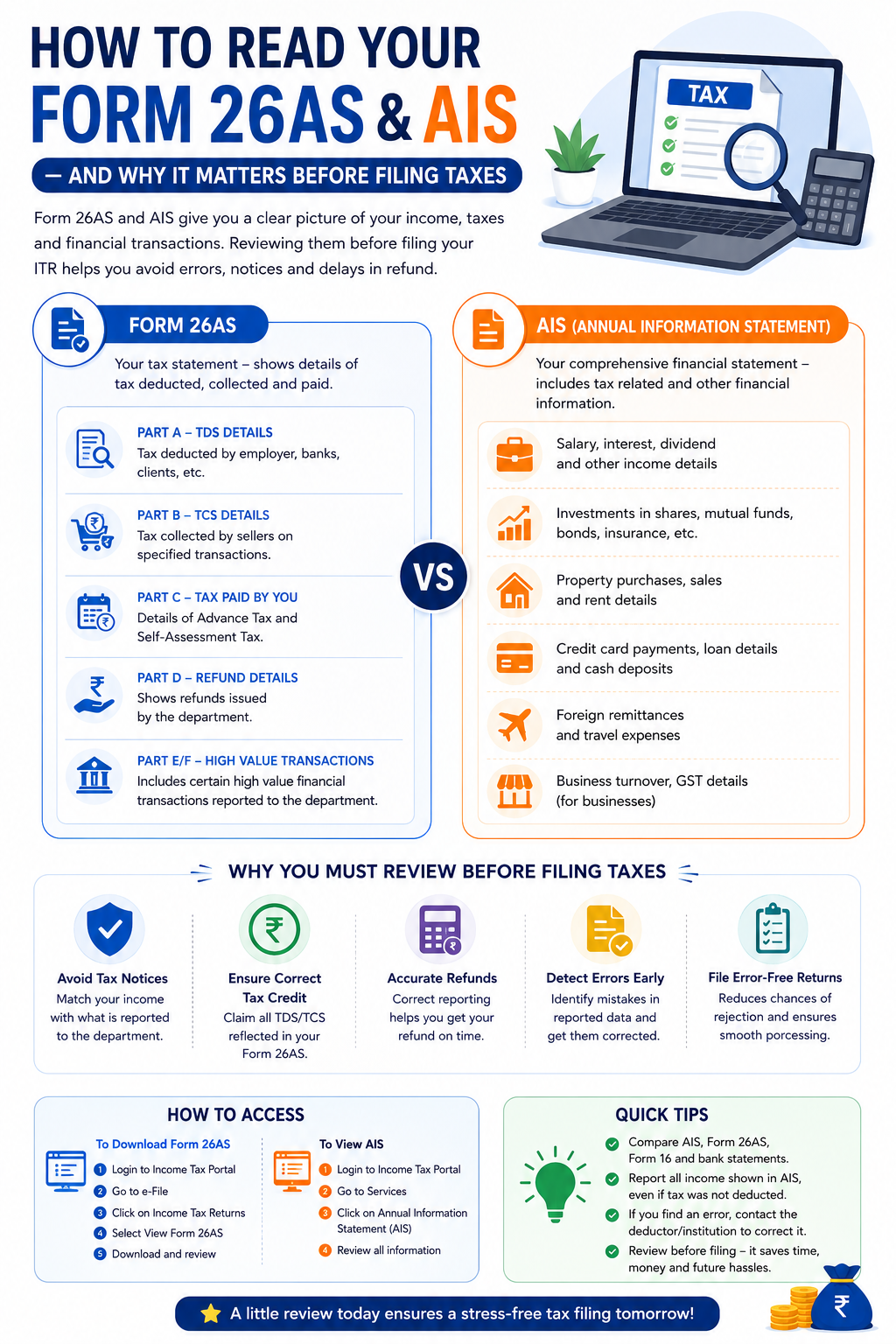
Filing your Income Tax Return (ITR) without checking your Form 26AS and Annual Information Statement (AIS) can lead to mistakes, notices, delayed refunds, or even tax mismatches. These documents act like a financial report card, showing the income earned, taxes deducted, and financial transactions linked to your PAN. Before submitting your ITR, understanding these reports is essential to ensure accuracy and avoid unnecessary complications.
What is Form 26AS?
Form 26AS is a tax statement issued by the Income Tax Department that reflects tax-related details linked to your PAN. It serves as a consolidated record of:
- TDS (Tax Deducted at Source) deducted by employers, banks, or clients
- TCS (Tax Collected at Source) on purchases
- Advance Tax and Self-Assessment Tax payments
- Income Tax Refunds received
- Certain high-value financial transactions
In simple terms, Form 26AS helps taxpayers verify whether the taxes deducted from their income have actually been deposited with the government.
Key Sections of Form 26AS
1. Part A – TDS Details
This section displays the tax deducted from your salary, professional fees, rent, FD interest, or any other payments.
What to check:
- Employer/company name
- TAN number
- Amount paid
- Tax deducted and deposited
Make sure the TDS shown matches your salary slips or income records.
2. Part B – TCS Details
Shows tax collected by sellers on specified transactions, such as vehicle purchases or foreign remittances.
3. Part C – Tax Paid by You
Contains details of:
- Advance Tax
- Self-Assessment Tax
Verify whether the tax you personally paid is reflected properly.
4. Part D – Refund Details
Shows income tax refunds processed by the department.
5. Part E/F – High-Value Transactions
Includes significant financial activities reported to the tax department.
Examples:
- Large deposits in bank accounts
- Property transactions
- Mutual fund or share investments
What is AIS (Annual Information Statement)?
The Annual Information Statement (AIS) is a more detailed version of tax-related financial information. It gives a broader picture of your financial activity during the financial year.
Unlike Form 26AS, AIS includes both tax-related and non-tax-related information.
AIS may show:
✅ Salary income
✅ Interest from savings accounts and FDs
✅ Dividend income
✅ Stock market transactions
✅ Mutual fund investments
✅ Property sales or purchases
✅ Foreign remittances
✅ GST turnover (for businesses)
✅ Credit card payments and other high-value spending
AIS is designed to help taxpayers report accurate income and reduce underreporting.
Difference Between Form 26AS and AIS
| Basis | Form 26AS | AIS |
|---|---|---|
| Purpose | Tax statement | Detailed financial statement |
| Includes TDS/TCS | Yes | Yes |
| High-value transactions | Limited | More detailed |
| Investment details | Limited | Extensive |
| Income reporting | Basic | Comprehensive |
Think of Form 26AS as your tax deduction summary, while AIS is your complete financial information report.
Why Checking Form 26AS and AIS Matters Before Filing Taxes
1. Helps Avoid Tax Notices
If the income shown in AIS differs from the income reported in your ITR, the Income Tax Department may issue a notice for mismatch.
For example:
You forgot to report ₹50,000 FD interest income visible in AIS. This can trigger scrutiny later.
2. Ensures Correct Tax Credit
Many taxpayers miss claiming TDS credits because they fail to verify Form 26AS.
If tax has been deducted but is not reflected, you should contact the deductor before filing.
3. Prevents Wrong Refund Calculations
Incorrect reporting may delay or reduce refunds.
Reviewing these documents helps ensure accurate refund claims.
4. Detects Errors in Financial Reporting
Sometimes banks, employers, or financial institutions upload incorrect data.
Checking AIS and Form 26AS gives you time to correct mistakes before filing.
5. Reduces Chances of Filing Defective Returns
Cross-verifying all income ensures a smooth filing process and reduces rejection risks.
How to Access Form 26AS and AIS
Steps to Download Form 26AS
- Login to the Income Tax Portal
- Go to e-File
- Click Income Tax Returns
- Select View Form 26AS
- Download and review the statement
Steps to View AIS
- Login to the Income Tax Portal
- Go to Services
- Click Annual Information Statement (AIS)
- Review all reported transactions carefully
Common Mistakes Taxpayers Make
❌ Filing ITR without checking AIS
❌ Missing FD interest income
❌ Ignoring stock market gains
❌ Not matching salary with Form 16 and Form 26AS
❌ Claiming excess TDS credit
Avoiding these mistakes can save time, money, and future tax hassles.
Final Thoughts
Your Form 26AS and AIS are two of the most important documents to review before filing taxes. They help you verify income, confirm tax deductions, and avoid mismatches that could lead to notices or delayed refunds.
Before filing your ITR, spend a few minutes reviewing both reports. A small check today can prevent major tax issues tomorrow.
Need help filing your ITR or understanding AIS/Form 26AS? Consult a tax expert to file accurately and stay compliant.